I have my trusty netbook on my lap. In one of my USB ports, I have a thumbdrive with the Ubuntu Netbook Live CD on it. I'm installing Ubuntu Netbook 10.10 right now. But not on my netbook's SSD. I'm installing it on an 8GB SD card.
I remember getting hard drives smaller than that. Storage-wise, I mean. Physically, they were the size of today's DVD drives. I'm sure that the performance of an SD card will bed poor compared to an SSD card, but a second face for $20 is kinda cool. Dual-boot on the cheap. My friend Patrick put Ubuntu on a thumbdrive so he could have "GoodOS" on his work laptop. I wanted to have something that wouldn't hang out too much. I don't use my SD slot often, so keeping it there works for me.
It's still configuring, so I can't say much. But such powerful and modular hardware is neat.
2011/02/05


New-To-Us TiVo, New-To-Us GPS
We have a TiVo. Finally. Yeah, I know we're ... a decade past the curve here? Something like that. I have to add that the TiVo+satellite box sucks because that means only one tuner, which means you cannot record this and watch that. But I have to say, the folks who say that the user interface to TiVo is a cut above? They have something there.
What sucks outright is the IR blasters. Well, they're OK, except there's no feedback loop. It would be far better to have the TiVo be the satellite box. I understand the HDMI interconnections of the Google TV box (of which there's really only the Logitech Revue, last I checked) have bi-directional communication, and that's what you really want.
It's a bit funny, though. We have a PC running Boxee and a Wii that does good Netflix. So far, we're widely distributed. I want a newer, faster PC for Boxee (and other duties, like home file+print server), and with the TiVo we now have access to Amazon On Demand. (Not like we've used it yet. We're still a Red Box family, and spinning discs of optical media at DVD quality is definitely a trailing-edge technology, no matter the shiny red vending machine.)
For Christmas, my father gave me his old TomTom. I have always wanted a stand-alone GPS, but not really for car use. Well, yes and no. I want a list of discrete lat&long coordinates I can map. I'm sure I can have that with the Evo phone, but I haven't really dived into that. Anyway, the point at this juncture is that I have a phone with a navigation feature, my wife had a phone with a navigation feature, and 2 of 3 sons had phones with navigation features. I thought "Hey, I'll never use this".
There are two reasons I've started to. First is the mount. I can mount the TomTom to the window and keep it in a good position. I don't have a good cellphone mount for the Evo. I love having the rolling map and the speedometer even when I don't have a destination set.
The second is duplication. I can have my phone set to do phone things, or provide audio, or even just on my belt as it should, and not worry about it forgetting my destination. Don't know how I'll really integrate it into my driving, though.
What sucks outright is the IR blasters. Well, they're OK, except there's no feedback loop. It would be far better to have the TiVo be the satellite box. I understand the HDMI interconnections of the Google TV box (of which there's really only the Logitech Revue, last I checked) have bi-directional communication, and that's what you really want.
It's a bit funny, though. We have a PC running Boxee and a Wii that does good Netflix. So far, we're widely distributed. I want a newer, faster PC for Boxee (and other duties, like home file+print server), and with the TiVo we now have access to Amazon On Demand. (Not like we've used it yet. We're still a Red Box family, and spinning discs of optical media at DVD quality is definitely a trailing-edge technology, no matter the shiny red vending machine.)
For Christmas, my father gave me his old TomTom. I have always wanted a stand-alone GPS, but not really for car use. Well, yes and no. I want a list of discrete lat&long coordinates I can map. I'm sure I can have that with the Evo phone, but I haven't really dived into that. Anyway, the point at this juncture is that I have a phone with a navigation feature, my wife had a phone with a navigation feature, and 2 of 3 sons had phones with navigation features. I thought "Hey, I'll never use this".
There are two reasons I've started to. First is the mount. I can mount the TomTom to the window and keep it in a good position. I don't have a good cellphone mount for the Evo. I love having the rolling map and the speedometer even when I don't have a destination set.
The second is duplication. I can have my phone set to do phone things, or provide audio, or even just on my belt as it should, and not worry about it forgetting my destination. Don't know how I'll really integrate it into my driving, though.
2011/02/03
New Multimedia Keyboard
I have the biggest remote I have ever seen.

It's the GKM561R keyboard from IOGear, which I got through NewEgg. It's got a built in trackball, which makes it better for multimedia settings than the Logitech wireless desktop I got before. I have always used Logitech wireless keyboards before, and I'm sure I'll get one again, but the mouse stopped working and got lost, and for multimedia applications, it makes sense.

Image from KVMGalore
There was a weird thing. The W key had fallen off, but it was securely in the packaging and was easy to replace. I'm loving the addition of a TV PC.
2011/02/02
The Internet of Things? The Semantic Web?
I have a dream.
I dream of a lamp. A lamp using LEDs. A lamp that changes color, depending on the ambient temperature outdoors. If the weather outside is frightful, the lamp indoors is blue-to-purple. If Summer's here and the time is right, the light is yellow, orange or even red.
This dream is in part inspired by my workplace in the subbasement of my building. I can very easily forget the season, even, when I'm head-down into my work, so any reminder of the conditions outisde would be good.
This is an example of what was called Ubiquitous Computing or Pervasive Computing, depending on who generated the buzzword. In essence, the data is everywhere around you, not just on your PC.
The thing that's really keeping me from realizing this dream is a lack of electronics skill.
But that's a smaller thing today.
There's a thing called an Arduino, which is an Open Source bit of hardware that begins to open up the world of programming small things. I'm fairly sure I could, given an Arduino and a breadboard, begin to dummy this up.
This kinda gets me to categorization issues. Does this concept, an internet-aware fixture that determines the shade by the weather report fall under the Semantic Web? Or is it more tightly connected to the Internet of Things concept? Or is it a bit of both, like a Reese's cup?
This is an example of what was called Ubiquitous Computing or Pervasive Computing, depending on who generated the buzzword. In essence, the data is everywhere around you, not just on your PC.
The thing that's really keeping me from realizing this dream is a lack of electronics skill.
But that's a smaller thing today.
There's a thing called an Arduino, which is an Open Source bit of hardware that begins to open up the world of programming small things. I'm fairly sure I could, given an Arduino and a breadboard, begin to dummy this up.
This kinda gets me to categorization issues. Does this concept, an internet-aware fixture that determines the shade by the weather report fall under the Semantic Web? Or is it more tightly connected to the Internet of Things concept? Or is it a bit of both, like a Reese's cup?
2011/01/28
Netflix As SpeedTest
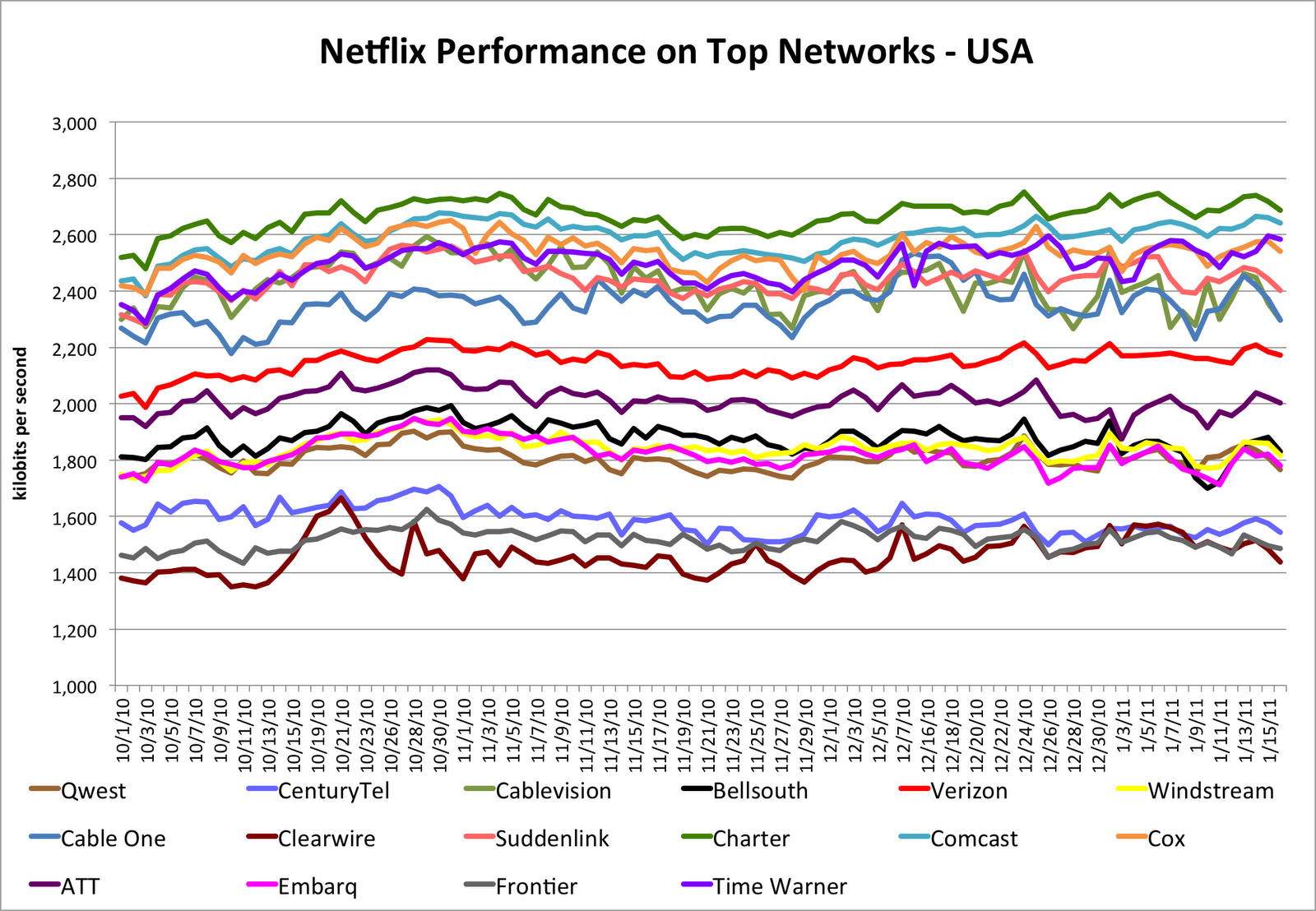
This is cool.
When you think about it, watching a movie from Netflix or something is a great way to test a network. This is a graph of different big ISPs and their throughput.
In the metric below, we’re filtering for titles that have HD streams available, and for devices capable of playing HD streams (which also filters out mobile networks), to highlight what’s achievable in terms of HD performance on the various ISP networks.What I find interesting is the high numbers for Comcast. Their light-blue line is consistently #2 on this graph here. I have said that nobody loves Comcast, they either hate Comcast or resign themselves to having to have them, but the data clearly puts them as having a good network.
(Thanks, LifeHacker)
2011/01/24
Sikuli X Stress Test
This video is of a stress test I built for Sikuli, a GUI scripting engine. It uses CV libraries to identify and interact with visual elements on your desktop. I've talked about it, but I haven't shown it, as I haven't had A means to. I'm now running Windows 7 on a fast computer, and I have Microsoft Expression Encoder installed. So, likely I'll have more screenvids in the future.
As you'll see in the code, I'm writing in modules. The first code I show is meant to provide functions for the second code I show.
checking_test
from sikuli.Sikuli import *

def clickAllLikeThis( image ):
 for i in findAll(image):
  click(i)

def checkAll():
 a_unchecked = findAll(unchecked)
 for u in a_unchecked:
  click(u)

def uncheckAll():
 a_checked = findAll(checked)
 for c in a_checked:
  click(c)
module_test
# works on all platforms
import sys
import os
# get the directory containing your running .sikuli
myPath = os.path.dirname(getBundlePath())
if not myPath in sys.path: sys.path.append(myPath)
import checking_test
unchecked = "1295894889335.png"
checked = "1295894985817.png"
popup( "Checking all unchecked" )
checking_test.clickAllLikeThis( unchecked )
popup("Unchecking all Checked")
checking_test.clickAllLikeThis( checked )
#clickAllLikeThis( checkbox )
The PNG strings are converted in the Sikuli editor, which has screengrab capabilities and converts the file name to the image.
I'm very glad that I'm able to separate functions into separate modules. I'm somewhat disturbed that I'm not getting 100% coverage from the elements I'm trying to get clicked. But it's a neat thing nonetheless.
2011/01/21
Java Interface issue that makes no sense to me
There's a Java tool I have to use, called Blast2GO. It's a Genomics thing and I'm very sure that program itself is not the problem, but it is the only reason I'm using Java. We run this on data wholesale, so we're waiting with bated breath for them to release a command-line interface or API for it, but until then, there's the GUI. And if you're repeating a GUI interface a couple dozen times in a row (easily), it becomes more and more likely that you'll forget something.
So, we're trying to automate it. We're using Sikuli. In a way, Sikuli is a wonder. It uses computer vision libraries to find and click things in a GUI environment. It has allowed us to automate much of the interface, which is a wonder.
In another way, it's totally wrong. GUIs are not a pipeable environment, and if you're going to automate something, command-line scripting is the simplest way. Stupid interface issues pop up rarely that way, while my wrangling with Sikuli is all about handling stupid interface issues.
And the most stupid, the most unsolvable stupid interface issue is this: I run Blast2GO on a Solaris server because that's where the data lives. So, I use X Windows to redirect the output onto my local machine. And right now, wherever I run it from, I lose the ability to navigate menus via arrow keys and move through open and save windows via tab. And, for the life of me, I have no idea why. But whenever I run it on those servers, I can't use those keys. This makes the scripting much harder.
Any idea why Java would be doing this to me? Is it a Solaris issue? A Java issue? An X Windows issue? Help!
2011/01/14
Graphical Programming with Yahoo Pipes
Let us start with the need. I found a tool to allow me to scroll RSS feeds across my desktop, just like every news channel. This is a neat thing, but I found that I didn't like the way it did RSS feeds. Instead of cycling through them, it kept using one. So, I set about solving that by combining feeds.
 The method I chose was Yahoo Pipes. When I decided to check Craigslist for items of certain types (Fender guitars, especially) in local areas (where I decided I could reasonably drive, should the catch of a lifetime come around), I used Pipes, mostly as an excuse to learn it. With Google Reader being the recipient of those feeds, I didn't need to massage them too much. The news I fed News was twitter feeds from news sites I wanted to follow, mostly local news and weather.
To the right, we see the "code" I used to combine seven news sources, (mostly) remove redundancies, do some slight editing to the content and ensure that only the day's news shows up. It's all Twitter RSS, so there's one date format, but that format is not usably sortable. I format today's date in the same format and filter out if it isn't there, but the better solution is to take a Unix timestamp of the current time and date (representing seconds since Jan. 1, 1970), subtract 24*24*60 (number of seconds in a day) and drop out entries that were not published during that time. That will take a slightly larger amount of cleverness to do that, but I think I'll crack that nut eventually.
The thing I notice is, while a graphical solution seems tailor-made to mimic flowcharts, there's no splitting here. It's all very linear, with minor loops and filters. I suppose I could get a more funnel-looking program if I handled the inputs separately. The more I play with Yahoo Pipes, the more I like it.
 The method I chose was Yahoo Pipes. When I decided to check Craigslist for items of certain types (Fender guitars, especially) in local areas (where I decided I could reasonably drive, should the catch of a lifetime come around), I used Pipes, mostly as an excuse to learn it. With Google Reader being the recipient of those feeds, I didn't need to massage them too much. The news I fed News was twitter feeds from news sites I wanted to follow, mostly local news and weather.
To the right, we see the "code" I used to combine seven news sources, (mostly) remove redundancies, do some slight editing to the content and ensure that only the day's news shows up. It's all Twitter RSS, so there's one date format, but that format is not usably sortable. I format today's date in the same format and filter out if it isn't there, but the better solution is to take a Unix timestamp of the current time and date (representing seconds since Jan. 1, 1970), subtract 24*24*60 (number of seconds in a day) and drop out entries that were not published during that time. That will take a slightly larger amount of cleverness to do that, but I think I'll crack that nut eventually.
The thing I notice is, while a graphical solution seems tailor-made to mimic flowcharts, there's no splitting here. It's all very linear, with minor loops and filters. I suppose I could get a more funnel-looking program if I handled the inputs separately. The more I play with Yahoo Pipes, the more I like it.
2011/01/13
Quick Notes: The Doomed Dozen, The New Radio
MaximumPC has list of 12 Technologies on the Bring of Disappearing. This is a bit more long-view than I normally go, but it makes sense.
The Doomed Half-Dozen
- Pre-recorded Physical Media
- Stereoscopic (with glasses) 3D TVs
- eBook Readers
- Consumer-Level Hard Drives
- Keys
- Handheld Gaming Consoles
The Half-Dozen Survivors
- Digital Music/Media Players
- Landline telephone
- Internal Combustion Automobile Engine
- The PC
- The Keyboard
- The Mouse
I do have some quibbles with the list, and some more quibbles with the presentation of the list. For instance, if you're going to keep the landline phone alive as a bulwark against power-outages, then why show a portable phone, whose base unit will die as soon as the power is cut? And the eBook reader holds a niche in that the screen makes it a low-energy device, opposed to the power-hungry notebooks, tablets and smartphones. They're mostly single-taskers, to borrow an Alton Brown term, but they can grow up and out the same way the digital media player is. The list is well-worth reading, though.
So, our car is in the shop, and the insurance company has us in a rental. It's a swank piece of motor art, with gratis satellite radio. We're not too used to it, but we're getting there. The Old Radio has been dead to me for quite some time, as it struck me that there wasn't anything I wasn't sick of being sent to me over those airwaves. The little I hear on the XM/Sirius channels I get over DishTV has been interesting, but never interesting enough for me to even consider it for myself. I have a large enough MP3 collection that I could go some months without repeating a song. (That I do repeat songs has something to do with being a musician, with the limits of Rhythmbox's shuffle function, and with the limits of the SD card in my phone.) And, quite honestly, I don't spend enough time on the road to make it worthwhile.
But I'm beginning to wonder about my wife. She does spend great amounts of time on the road, and given her preference for talk radio, I'm thinking it might be good fit for her. Her stations come out of Chicago and are mostly static when she comes to pick me up. But then, I'm wondering if streaming it with 3G or 4G smartphones would be a better solution.
What are your thoughts about dying technologies and/or the New Radio?
2011/01/04
Defining Terms: Copy-and-Paste vs Cargo-Cult
During WWII, in the South Pacific, major sea battles left many sinking cargo ships, whose cargo then floated to neighboring islands. Sufficiently advanced technology is indistinguishable from magic, and the inhabitants of these islands had been barely touched by the events of the 20th century so far, so they took the cargo as signs of gods who should be worshipped. Thus a
In contrast,
Clearly, two anti-patterns you should try to avoid in your programming life, to be sure, but if you copy code from a website and paste it into your own program, you are not a copy-and-paste programmer. Please respect the distinction.
cargo cult programmer is a person who takes the sample code as the work of a diety, not to be understood and changed but to sit, inviolate, in the code base.In contrast,
copy-and-paste programming is taking a solution for one case and copying it, pasting it, making a small change for the next case, and so on. If there's one line of change in a 20-line copied chunk, this means that there are 19 lines that are duplicated, and if there's a problem, 19 lines that have to be serially debugged and fixed wherever you left them, and you might easily forget many of them. It's better to pull as much as you can to a subroutine so if there's a bug, there is one and only one place you have to go to fix it.Clearly, two anti-patterns you should try to avoid in your programming life, to be sure, but if you copy code from a website and paste it into your own program, you are not a copy-and-paste programmer. Please respect the distinction.
Subscribe to:
Posts (Atom)